Set up an employee's tax and contributions
Income tax exemptions, TD59 deductions, life insurance, provident fund, Social Insurance, GESY, the Holiday Fund and contribution schemes for one employee.
Last updated
How much income tax and how many contributions an employee pays depends on more than their pay. Their exemption, the deductions they declare, their provident fund and the funds they belong to are all set on the employee's Tax & contributions tab. Get these right before the first run that pays them.
You need the Admin or Payroll manager role to change them. A Viewer can see the tab but not edit it.
Where to find it
Open Employees, click the employee, then the Tax & contributions tab. It shows what's set now. To change anything, click Edit: the Edit employee window opens on the same tab.
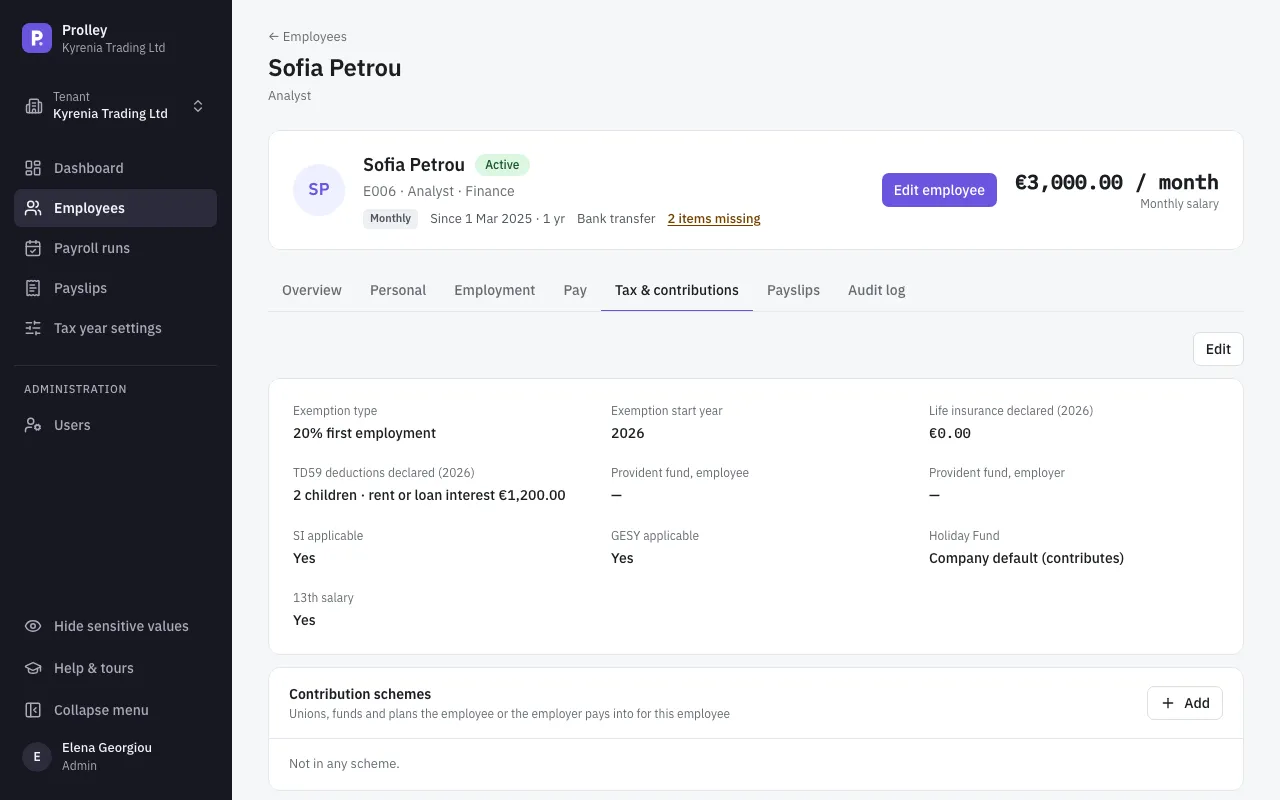
Your change applies straight away to runs that are still Draft or Calculated: they're recalculated with it. Approved and Locked runs keep the figures they were calculated with. A terminated employee can't be edited.
Income tax exemption
Some employees are entitled to have part of their income exempted from tax. Choose the Exemption type and enter the Exemption start year:
| Exemption type | What it does (2026 figures) | Lasts |
|---|---|---|
| 50% new resident | Half the income is exempt, only when the year's income is above €55,000 | 17 years |
| 20% first employment | A fifth of the income is exempt, up to €8,550 a year | 7 years |
| 25% repatriation | A quarter of the income is exempt, up to €25,000 a year, only when the year's income is above €30,000 | 7 years |
An employee can have only one exemption. Once it has run its course, counted from the start year, Prolley stops applying it and the run shows a warning. The amounts and the number of years are in Tax year settings.
What the employee declares for the year
Each year, employees can declare their life insurance premiums and the deductions of the TD59 form. Enter them for the current year:
- Life insurance declared: the year's premiums.
- Children declared and whether the employee is a Single parent.
- Rent or housing loan interest for their main home.
- Green investment, such as an energy upgrade or an electric vehicle.
- Natural disaster insurance.
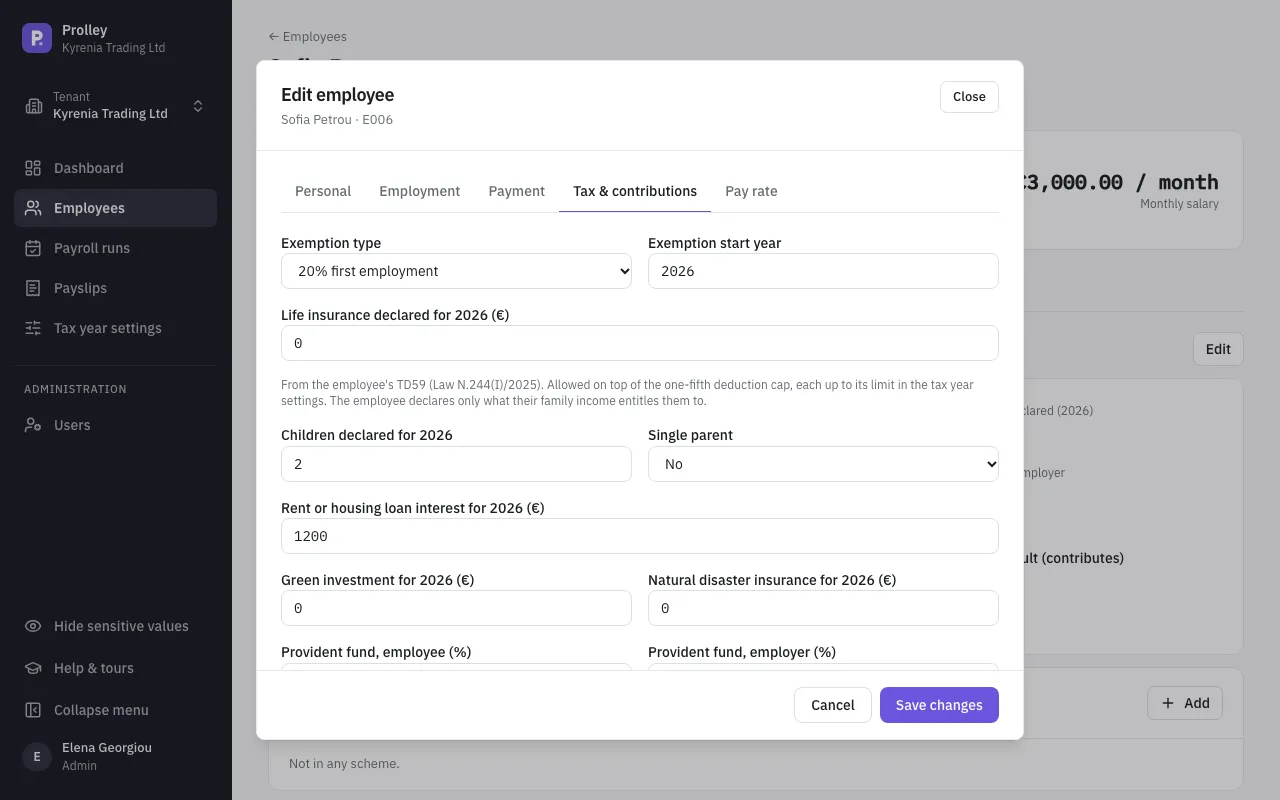
The TD59 deductions reduce taxable income on top of everything else, each up to its limit (2026):
| Deduction | Allowed |
|---|---|
| Children | €1,000 for the first, €1,250 for the second, €1,500 for each one after. Doubled for a single parent |
| Rent or housing loan interest | Up to €2,000 |
| Green investment | Up to €1,000 |
| Natural disaster insurance | Up to €500 |
How the deductions add up
Social Insurance, GESY, the provident fund, life insurance and some contribution schemes reduce taxable income, but together by at most a fifth of the income left after the exemption. Trade union subscriptions and the TD59 deductions come on top of that limit, in full.
For example, an employee earning €3,000 a month with a 13th salary, the 20% first employment exemption and two children has €39,000 of income for 2026. €7,800 of it is exempt. Social Insurance and GESY (€4,465.50) are within the fifth, and the two children add €2,250. The tax for the year is €496.90, so €38.22 is withheld in January.
Provident fund
If the employee is in a provident fund, enter the Provident fund, employee and Provident fund, employer percentages. They're charged on basic pay, not on the 13th salary.
If the fund is set up as a contribution scheme instead (see below), leave these empty, or the employee pays twice.
Social Insurance and GESY
SI applicable and GESY applicable are on for almost everyone. Switch one off only for an employee who isn't subject to it. An employee not subject to Social Insurance also pays nothing into the Holiday Fund.
Holiday Fund
Whether your company pays into the central Holiday Fund is set in Tax year settings. Each employee follows that setting unless you choose otherwise:
- Company default (contributes) or Company default (exempt): follows the company. The brackets show what the company setting is today.
- Exempt: no Holiday Fund for this employee.
- Contributes: Holiday Fund for this employee, even if the company is exempt.
When the employee contributes, the Holiday Fund rate (%) can be left empty to use the tax year's rate, which is the rate for the statutory leave (20 days, or 24 on a 6-day week). An employee with more annual leave is charged a higher rate: Rate by annual leave days shows the published table to find it.
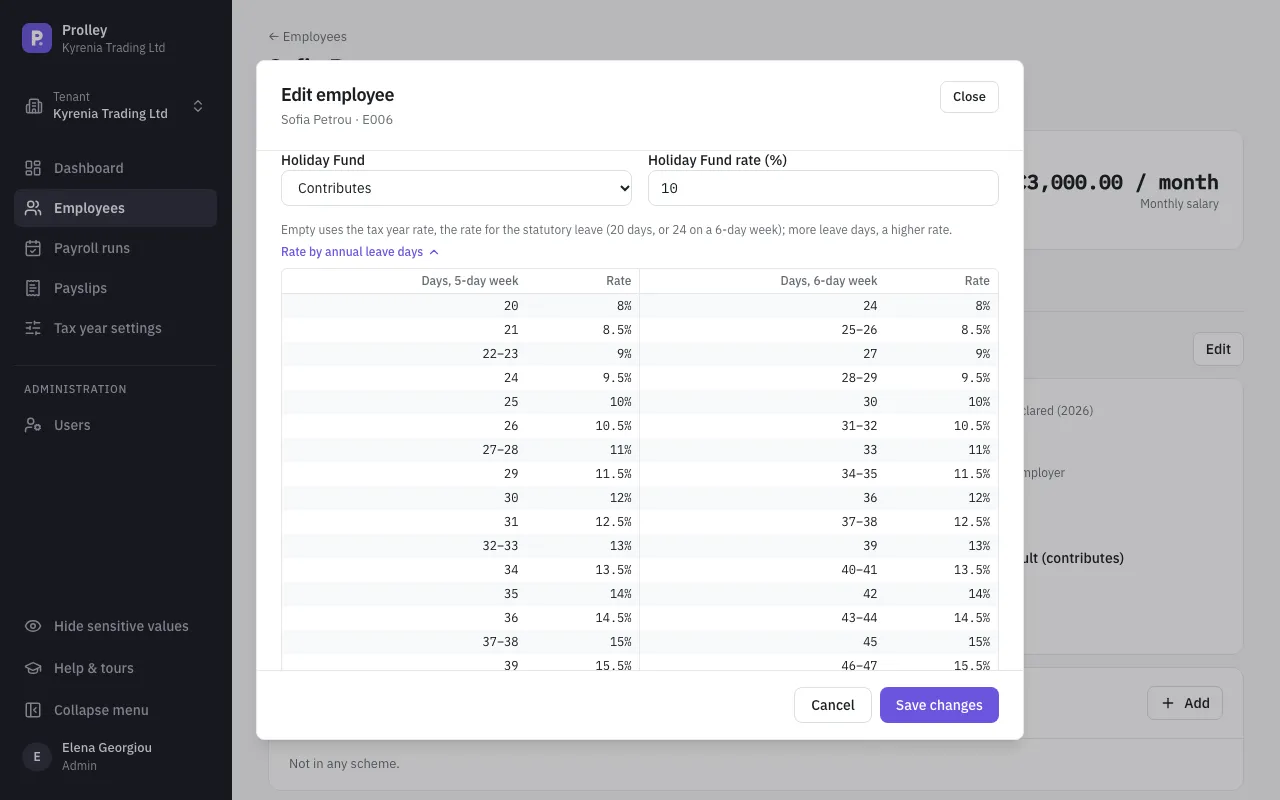
A rate below the tax year's rate shows a warning on the run, but doesn't stop it. The Holiday Fund setting has no history: a change applies to every run that's still open.
13th salary
Tick 13th salary for employees who get one. For hourly staff and annual rates you also choose how it's worked out. See Fix a locked run and pay the 13th salary.
Contribution schemes
Unions, medical and welfare funds, and pension plans the employee belongs to are listed under Contribution schemes at the end of the tab. To add one, click Add, choose the Scheme and the date it applies From, and optionally a To date and a Membership number. The schemes themselves are set up in Tax year settings; see Unions, funds and other contribution schemes.
Set elsewhere
- Benefits in kind and unpaid leave are entered in each run, on the employee's row. See Run your first monthly payroll.
- Rehiring a former employee is on the Employment tab.
- Imported employees come in without any of these settings: set them here after an import.